Sunday, May 24, 2009

A web tool hailed as a significant rival to search giant Google has gone live to the public.

Wolfram Alpha is called a computation knowledge engine rather than a search engine and wants to change the way people use online data.

It aims to give people direct answers to queries rather than send them to other sites where they may find what they are seeking.

The system is the brainchild of British-born physicist Stephen Wolfram.

Wolfram Alpha was unveiled in late April and since then has been publicly demonstrated and some people have had a chance to run queries through it.

Typically the results it returns are annotated pages of data rather than a simple list of other sites that might help resolve a user's query.

For example, if asked about the weather in Manchester it would present a graph of average temperatures, rainfall and other salient data.

The computational horsepower behind the main site works out answers to question as they are put by grabbing data from databases and consulting feeds of relevant information.

Wolfram Alpha can be asked known facts, such as the height of mountains, or be asked to generate new information such as up to date figures for a nation's GDP.

It can also handle complicated mathematical queries, plot statistics and produce charts of natural events.

The data it consults is chosen and managed by staff at Wolfram Research who ensure it can be displayed by the system. Behind the scenes Wolfram Alpha has about 10,000 CPUs spread across five data centres that it draws on when generating answers.

During a demonstration at Harvard University's Berkman Center for Internet and Society, Dr Wolfram said: "Our goal is to make expert knowledge accessible to anyone, anywhere, anytime."

Dr Wolfram played down talk that the system would be a Google killer and instead presents it as a way for people to get more out of the information on the web.

The final tuning and testing of the system was webcast live during the weekend before the official launch.

Prior to the start of the webcast and final testing, Theo Grey, co-founder of Wolfram Research, said: "If we do melt down when we go live it will not be for lack of effort, or any sort of naive idea of how many queries we might get. It will be because of overwhelming response."

Reference: http://news.bbc.co.uk/2/hi/technology/8052798.stm


Sunday, May 17, 2009

Dell Vostro A840 Windows XP Drivers Download

For Windows XP Audio - Modem Drivers - Dell Vostro A840 / A860.

Don't install the Drivers directly !

Follow the steps below.

1. Install SP32646.exe

2. After installing SP32646.exe, Install SP34386.exe

Once you have followed above 2 steps, now windows will recognize and found High Definition Audio Driver (for AMD) & Universal Audio Architecture (UAA) Bus Driver for High Definition Audio).


3. Now install the Dell Drivers R192894.exe & R190098.exe

References:

  1. http://seoroot.com/blog/windows-xp/dell-vostro-a840-windows-xp-drivers-download.html - Thanks to HyLyX
  2. http://mytopfiles.com/programs/file/sp32646/54344.htm - Special Thanks to Top Files
  3. http://postdownload.filefront.com/8984671//dd1fbc64132245ccdf5287915be0ee44e30b39d3dded5c7a8eee4d0aa58d22cde17670287769152d
  4. And Finally Special Thanks to GOOGLE ;-)

Tuesday, May 05, 2009

Tips for IM Client

It’s been a pleasure to watch Google Talk enter the over-saturated niche of popular instant messages and then quickly dominate. I am Google Talk user myself. I can vaguely understand why I ultimately chose it over other IMs I would use; probably because most of my contacts have only one thing in common: Gtalk.

So today I am sharing a few best tips on how to make the most of your Gtalk:

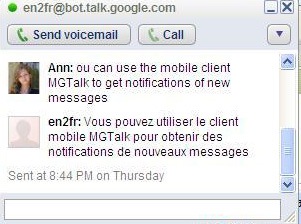
Translate using Google Talk (the feature runs on Google Translate). Just add any of the bots below (there may be many more) and send them messages of the text you want to translate):

Bot
Translation
ar2en@bot.talk.google.com from Arabic into English
de2en@bot.talk.google.com from German into English
fr2en@bot.talk.google.com from French into English
el2en@bot.talk.google.com from Greek into English
es2es@bot.talk.google.com from Spanish into English
ja2en@bot.talk.google.com from Japanese into English
ko2en@bot.talk.google.com from Korean into English
en2nl@bot.talk.google.com from Dutch into English
ru2en@bot.talk.google.com from Russian into English
zh2en@bot.talk.google.com from Chinese into English

Gtalk as a free and easy website live chat client:

You can place Gtalk button on your site and let your site visitors contact you using it. Create your Google Talk badge here;

Other IM Clients which works for Gtalk.

  1. pidgin
  2. Gajim
  3. Gaim
  4. eBuddy
  5. Koppete
  6. Digsby - The best !
And lot more read more

Featured Google Talk client: Digsby

DigsBy is by far my favorite third-party Google talk application not because it offers some extra-ordinary Gmail possibilities (well, it does have some cool GTalk enhancements) but because it integrates all my major IMs and social media networks in one handy tool. The platform it supports include:

  • IMs: GTalk, AIM, Yahoo! Messenger, Facebook chat;
  • Email notifications: Gmail, Yahoo, Hotmail, AOL mail;
  • Social networks: Twitter, Facebook, LinkedIn, MySpace.

Some cool features I am personally using:

  • For each social network add as many accounts as you want;
  • Sort Gtalk (and other) contacts into groups (!);
  • Set tracking for any GTalk buddy: e.g. get notified when some person signs in or changes the status message;
  • See all the contact info when hovering over;
  • Sort contacts by name, status,
  • Reply right from the pop-up;
  • Manage multiple conversations with tabbed conversation windows;
  • Set your Facebook, Twitter and LinkedIn status right from Digsby;
  • Synchronize your settings and accounts between computers.

Download Digsby:

  • coming soon for Linux - Subscribe for newsletter
Chat Windows - Appearance


FaceBook - Twitter - Social Networking Integration !


Chat Notification - As well as Reply from Notification Directly !


Email Notifications and more.....